Expand description
§sponge256sum
A command-line tool for computing SpongeHash-AES256 message digest.
This program is designed as a drop-in replacement for sha1sum, sha256sum and related utilities.
Please see the library documentation for details! 💡
§Synopsis
This command-line application can be used as follows:
Usage: sponge256sum [OPTIONS] [FILES]...

Arguments:
  [FILES]...  Files to be processed

Options:
  -b, --binary           Read the input file(s) in binary mode, i.e., default mode
  -t, --text             Read the input file(s) in text mode
  -c, --check            Read and verify checksums from the provided input file(s)
  -d, --dirs             Enable processing of directories as arguments
  -r, --recursive        Recursively process the provided directories (implies -d)
  -x, --cross-dev        Descend into directories on other devices (implies -r)
  -a, --all              Iterate all kinds of files, instead of just regular files
  -k, --keep-going       Continue processing even if errors are encountered
  -l, --length <LENGTH>  Digest output size, in bits (default: 256, maximum: 2048)
  -i, --info <INFO>      Include additional context information
  -s, --snail...         Enable "snail" mode, i.e., slow down the hash computation
  -q, --quiet            Do not output any error messages or warnings
  -n, --no-color         Disable colored terminal output (ANSI color codes)
  -p, --plain            Print digest(s) in plain format, i.e., without file names
  -0, --null             Separate digest(s) by NULL characters instead of newlines
  -m, --multi-threading  Enable multi-threaded processing of input files
  -f, --flush            Explicitly flush 'stdout' stream after printing a digest
  -T, --self-test        Run the built-in self-test (BIST)
  -h, --help             Print help
  -V, --version          Print version

If no input files are specified, reads input data from the 'stdin' stream.
Returns a non-zero exit code if any errors occurred; otherwise, zero§Examples
Here are some sponge256sum usage examples:
-
Compute the hash values (digests) of one or multiple input files:
$ sponge256sum /path/to/first.dat /path/to/second.dat /path/to/third.dat -
Selecting multiple input files can also be done with wildcards:
$ sponge256sum /path/to/*.dat -
Process all files in a directory, including all files found in all subdirectories:
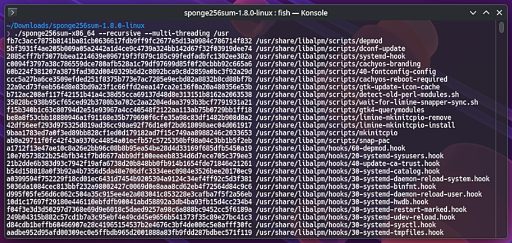
$ sponge256sum --recursive /path/to/base-dir -
Compute the hash value (digest) of the data from the
stdinstream:$ printf "Lorem ipsum dolor sit amet consetetur sadipscing" | sponge256sum -
Verify files (hashes) from an existing checksum file:
$ sponge256sum --check /path/to/SPONGE256SUMS.txt
§Options
The following options are available, among others:
-
Directory processing
The
--dirsoption enables directory processing. This means that for each input file name (path) that resolves to a directory, the program processes all files contained in that directory, but without descending into subdirectories.Additionally, the
--recursiveoption enables recursive directory scanning, behaving identically to the--dirsoption except that it also traverses subdirectories. The--recursiveoption implies the--dirsoption.By default, the program does not descend into directories that have a device number different than that of the directory from which the descent began. This restriction may be bypassed by specifying the
--cross-devoption.Furthermore, the
--alloption can be combined with--dirs,--recursiveor--cross-devto process all files found in a directory. Otherwise, the program will only process “regular” files, skipping special files like FIFOs or sockets. -
Checksum verification
The
--checkoption runs the program in verification mode. This means that a list of checksums (hash values) is read from each given input file, and those checksums are then verified against the corresponding target files.This mode expects input files to contain one checksum (and its corresponding file path) per line, formatted as follows:
<HASH_VALUE_HEX><SPACE><FILE_PATH><EOL>All checksums (hash values) in a particular checksum file are expected to have the same length, in bits.
If the
--info,--textor--snailoption has been used to calculate the hash values in a checksum file, then the same--info,--textor--snailparameter(s) must be used for the checksum verification again! 🚨 -
Multi-threading
The
--multi-threadingoption enables multithreading mode, in which multiple files can be processed concurrently.Note that, in this mode, the order in which the files will be processed is undefined. That is because the work will be distributed across multiple “worker” threads and each result is printed as soon as it becomes available.
Also note that each file still is processed by a single thread, so this mode is mostly useful when processing many files.
-
Output length
The
--length <LENGTH>option can be used to specify the digest output size, in bits. The default size is 256 bits.Currently, the maximum output size is 1024 bits. Also, the output size, in bits, must be divisible by eight!
-
Context information
The
--info <INFO>option can be used to include some additional context information in the hash computation.For each unique “info” string, different digests (hash values) are generated from the same messages (inputs).
This enables proper domain separation for different uses, e.g., applications or protocols, of the same hash function.
-
Snail mode
The
--snailoption can be passed to the program, optionally more than once, to slow down the hash computation.This improves the security of certain applications, e.g., password hashing, by making “brute force” attacks harder.
Count Number of permutation rounds Throughput (in KiB/s) – 1 (default) 249,245.54 ×1 13 8,595.85 ×2 251 441.40 ×3 4093 25.82 ×4 65521 1.61 -
Text mode
The
--textoption enables “text” mode. In this mode, the input file is read as a text file, line by line.Unlike in “binary” mode (the default), platform-specific line endings will be normalized to a single
\ncharacter.
§Environment
The following environment variables are recognized:
-
SPONGE256SUM_THREAD_COUNT:
Specifies the number of threads to be used in--multi-threadingmode.
If set to 0, which is the default, the number of CPU cores is detected automatically at runtime.
Please note that the number of threads is currently limited to the range from 1 to 32. -
SPONGE256SUM_DIRWALK_STRATEGY:
Selects the search strategy to be used for walking the directory tree in--recursivemode.
This can beBFS(breadth-first search) orDFS(depath-first search). Default isBFS. -
SPONGE256SUM_SELFTEST_PASSES:
Specifies the number of passes to be executed in--self-testmode. Default is 3.
§Exit status
The process returns one of the following exit status codes:
- 0 – The process completed successfully.
- 1 – The process completed, but one or more files were skipped due to errors (only when
--keep-goingis used). - 2 – The process failed due to an error (for example, an I/O error).
- 3 – The process has been interrupted by the user; generated output may be incomplete.
§Platform support
This crate uses Rust edition 2021, and requires rustc version 1.89.0 or newer.
The following targets are officially supported, other platforms may function but are not guaranteed:
- Linux
- Windows
- macOS
- *BSD (FreeBSD, OpenBSD, NetBSD, etc.)
- Haiku OS
- Solaris / Illumos
§License
Copyright (C) 2025-2026 by LoRd_MuldeR <mulder2@gmx.de>
Permission to use, copy, modify, and/or distribute this software for any purpose with or without fee is hereby granted.
THE SOFTWARE IS PROVIDED “AS IS” AND THE AUTHOR DISCLAIMS ALL WARRANTIES WITH REGARD TO THIS SOFTWARE INCLUDING ALL IMPLIED WARRANTIES OF MERCHANTABILITY AND FITNESS. IN NO EVENT SHALL THE AUTHOR BE LIABLE FOR ANY SPECIAL, DIRECT, INDIRECT, OR CONSEQUENTIAL DAMAGES OR ANY DAMAGES WHATSOEVER RESULTING FROM LOSS OF USE, DATA OR PROFITS, WHETHER IN AN ACTION OF CONTRACT, NEGLIGENCE OR OTHER TORTIOUS ACTION, ARISING OUT OF OR IN CONNECTION WITH THE USE OR PERFORMANCE OF THIS SOFTWARE.
§See also
🔗 https://crates.io/crates/sponge-hash-aes256
🔗 https://github.com/lordmulder/sponge-hash-aes256